
Logging in to Casino UA is done through the form in the top right corner of the home page: email or phone, password, the "Sign in" button. What opens next is the Casino UA account area — balance, transaction history, bonuses with their wagering status, messages from support. Below we go through signing in from a phone and from a PC, the usual errors, resetting a password, protecting the account and the Casino UA support channels.
The material is aimed at newcomers who have just finished registering at Casino UA. Registration takes a minute: phone number, email, password, acceptance of the terms, confirmation through the link in the letter. The alternative is a quick start through a Google profile. Identity verification (the Diia service, BankID, or uploading a passport or ID card) is mandatory before the first withdrawal from a Casino UA account.
This text is informational and is not a call to gamble. Gambling carries a financial risk. Play is available to people aged 21 and over.
| Parameter | Value |
|---|---|
| Sign-in credentials | Email or phone number + password |
| Where the form is | Top right corner of the site |
| Quick registration | Through a Google profile |
| Confirming registration | A link in the letter sent to your email |
| Verification | Diia, BankID, a scan of a passport or ID card |
| BankID check time | about 5 minutes |
| Classic document check | up to 24 hours |
| Account currency | hryvnia (UAH) |
Signing in to a Casino UA account
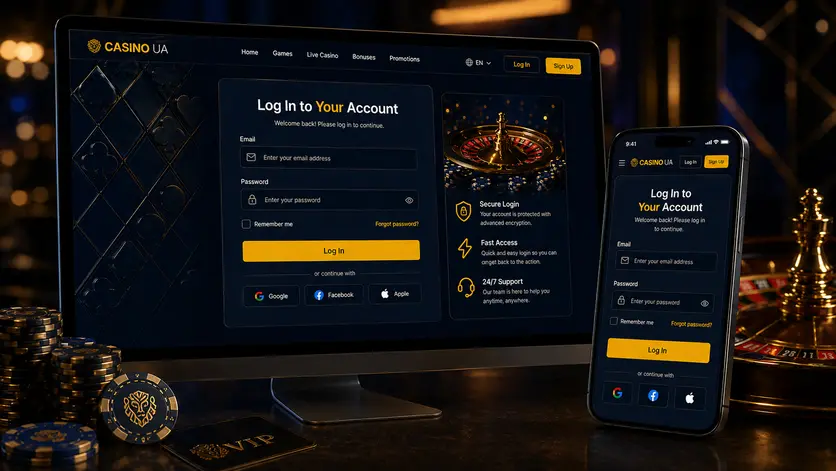
Signing in at Casino UA is tied to the contact given at registration. One account — one player; passing your login to anyone else breaks the platform's rules and gets the account blocked along with its balance.
Logging in by number or by email
- Open the Casino UA site and press "Log in".
- Choose the route: the phone number in +380 format, or the email address.
- Type the password, minding the case.
- Press "Sign in".
- If asked, confirm the login with a code.
What the account area opens up after sign-in
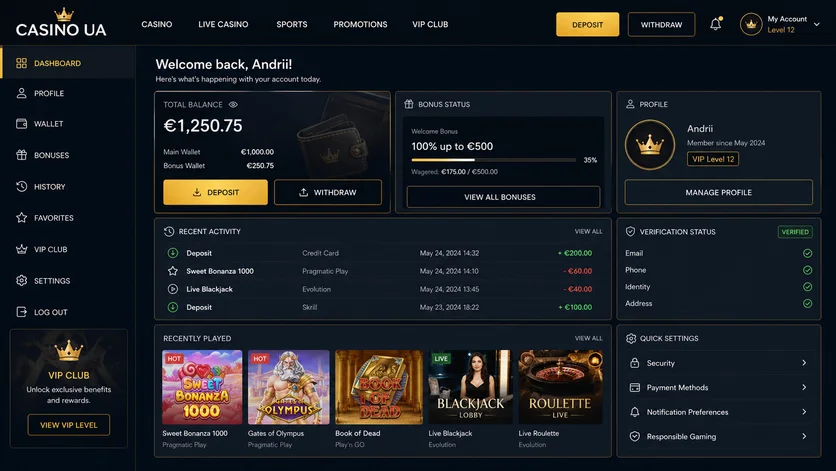
The Casino UA account area gathers personal details, the current balance, transaction history, active bonuses — those from a Casino UA promo code among them — with their wagering status, and the correspondence with support. The verification status is checked here too — without it the Casino UA cashier only takes deposits.
Signing in from a phone and a PC at Casino UA
One Casino UA login works on every device. The mobile version opens in any browser with nothing to install, and if you download Casino UA as an app, the sign-in form and the credentials stay the same.
The first sign-in from a new device
Casino UA records a sign-in from a new device separately. Confirmation by SMS or by email is likely — the code lives for a limited time, usually a few minutes. With two-factor authentication switched on, a one-time code is asked for after the password.
Android, iPhone and the mobile browser
Signing in from a mobile on Android or iPhone is no different from the desktop: the same Casino UA page, the same password. The only difference is autofill — the password managers of iOS and Chrome sometimes insert outdated details, so the field is worth clearing by hand.
Parallel sessions and automatic sign-out
A session ends after a long spell of inactivity or a change of IP address. That is a Casino UA safety mechanism, not a sign-in error. When you finish playing, sign out, especially on a shared computer.
| Device | What is different about signing in |
|---|---|
| PC, browser | The full form, access to every section of the account area |
| Mobile browser | Responsive layout, sign-in from a phone with nothing to install |
| Android app | The login is remembered, a push notification on sign-in |
| iPhone / iPad | Keychain autofill, old passwords may clash |
| Someone else's device | A private window and a manual sign-out afterwards |
Unable to sign in to Casino UA
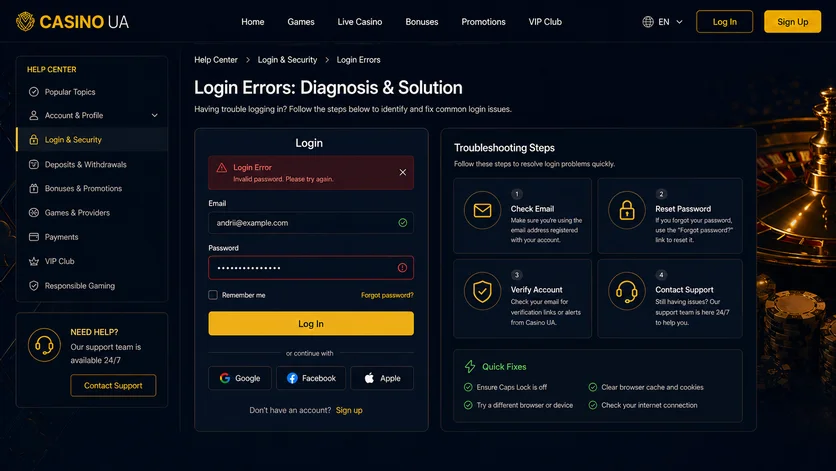
Most failures come down to the browser cache, the keyboard layout or unfinished verification rather than the account itself. Before writing to Casino UA support, it is worth running the basic checks.
The password fails although the login is right
A rejected password usually means Caps Lock, a Cyrillic keyboard layout or a space the mobile keyboard adds by itself. Check the characters with the "eye" icon in the Casino UA sign-in field.
The sign-in button does not respond
- Refresh the page with Ctrl+F5.
- Clear the cache and cookies for the last 24 hours.
- Switch off the ad blocker and any VPN extension.
- Try another browser or an incognito window.
- Check the connection — mobile internet instead of Wi-Fi.
The site throws you back to the sign-in form
A redirect loop means the session cookie is not being kept. The cause is blocked third-party cookies, an outdated browser or a system clock off by more than a few minutes. The Casino UA official site will not accept a token whose time does not match.
| Symptom | What to do |
|---|---|
| Trouble signing in after a password change | Sign in again on every device |
| A message about the account being blocked | Write to support with the profile details |
| The code is rejected | Request a new one; the old one is deactivated |
| The form does not load | Another browser or the mobile network |
| Sign-in works but the games do not | Check the verification status |
Resetting a Casino UA password
A password reset needs no help from the operator as long as you still have the email or the number. Restoring access to Casino UA takes up to five minutes.
Resetting through a linked contact
- Press "Forgot password" under the form.
- Give the email or phone from the profile.
- Receive the letter with a link or the SMS with a code.
- Set a new password: 8 characters or more, mixed case and digits.
- Sign in to Casino UA with the new details.
The code or the letter does not arrive
- Check the "Spam" and "Promotions" folders.
- Make sure the address was entered without a typo.
- Wait 2–3 minutes before asking for another one.
- Check that the mailbox is not full.
- For SMS — turn off flight mode and check the coverage.
The pause after failed attempts
After several wrong entries the Casino UA form locks for 15–30 minutes. Going around it through a VPN only extends the limit — wait for the timer to run out.
Sign-in security at Casino UA
Protecting a Casino UA account starts with the address bar. A licensed operator works on a domain with an HTTPS certificate and never asks for a password in a messenger or over the phone.
Signs of a fake form
- A domain with extra characters or hyphens.
- No HTTPS padlock in the browser bar.
- A request for your email password or a code from a bank SMS.
- A bonus promised in exchange for "signing in again".
- A link from an advert instead of your own bookmark for the Casino UA site.
What to do after a suspicious sign-in
- Change the password at once.
- Switch on two-factor authentication.
- Check the transaction history and the withdrawal details.
- Write to Casino UA support, noting the time of the incident.
Someone else's device and private mode
A safe sign-in to Casino UA from someone else's computer means a private window and no saved password. After the session, clear the browser data.
| Measure | Effect |
|---|---|
| A password of 12 characters or more | Resistance to brute force |
| Two-factor authentication | Blocks a sign-in without the code |
| A current email address | Guarantees a password reset |
| Verification through BankID | Ties the account to a person |
| Signing out by hand | Closes the active session |
Casino UA support on sign-in matters
Casino UA resolves access questions after identification: you will need the full name, the profile's email or phone and the approximate date of the last transaction. Staff never ask for the password.
| Channel | What it is for |
|---|---|
| Online chat | Urgent sign-in failures |
| Complaints, documents, unblocking | |
| Phone | Confirming the identity of the account holder |
| The account area | Verification and ticket status |
FAQ
Short answers to the questions newcomers ask most often after registering at Casino UA.
How do I restore access without my old phone number?
Use the linked email to reset the password. If both contacts are lost, write to Casino UA support with a copy of the document verification was done with. A number is changed by hand after the details are checked against the profile.
Why is my previous balance missing after signing in?
Usually a second account has been created with a different email address. Check the address you used to sign in to Casino UA. Duplicate profiles are not allowed: support merges them or closes the extra account after a check.
Why can I sign in but the cashier is limited?
Signing in to Casino UA and being verified are two different things. Until the check through Diia, BankID or documents is finished, withdrawals stay blocked. BankID takes about 5 minutes, a manual check up to a day.
How do I end a session on another device?
Change the password — that breaks every active session except the current one. Then sign in to Casino UA again from the mobile or the PC. Check the transaction history as well for operations that are not yours.
This material is a reference and is not an advertisement for gambling. Play only on licensed sites, set deposit limits, and ask for help at the first signs of a gambling addiction.